
Multi-model responses
Compare AI models side by side, then keep the best path
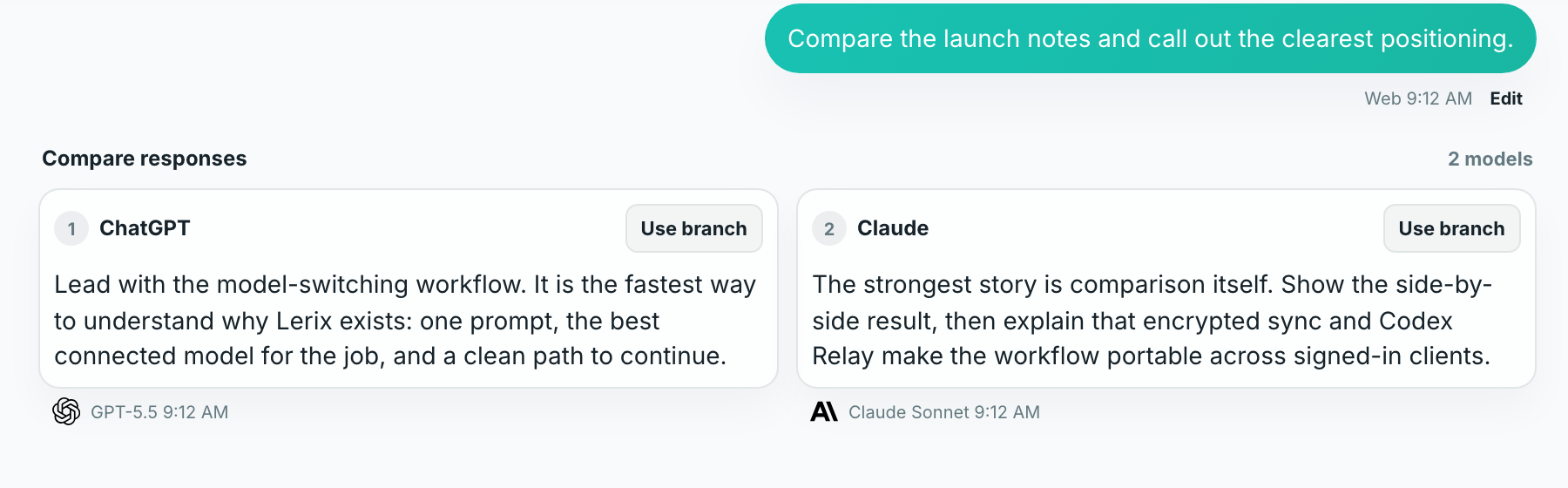
Ask the same question across connected model configurations without copying prompts between tabs. Lerix keeps every answer in one comparison, preserves the model and access path behind it, and lets you choose the branch worth continuing.
- One prompt, multiple connected model configurations
- Side-by-side review on desktop and swipeable comparison on phones
- Choose a response branch or keep the comparison going
Why compare
Model choice becomes visible work, not tab juggling
Different models can frame the same problem differently. That is useful only when the question, context, and review criteria stay consistent. Copying a prompt between separate apps makes it easy to change the wording, lose attachments, or forget which settings produced an answer.
Multi-model responses send one Lerix prompt to the connected configurations you select. The results stay grouped inside the same chat, so you can compare the substance instead of reconstructing the setup.
Use comparison when a second perspective can change a decision: important writing, research synthesis, technical judgment, planning, or any answer you expect to reuse.
Workflow
From one prompt to a useful branch
- Connect at least two model configurations.Add AI-service API keys, or use another supported access path such as Codex auth.
- Open the model menu.Add the model configurations you want to compare. A comparison starts only when at least two targets are selected.
- Send once.Lerix runs the prompt through each selected configuration and keeps the responses in one group.
- Review the differences.Desktop and tablet show responses side by side. Phone screens use a horizontal swipe group with the next response edge still visible.
- Choose what continues.Use a response branch when one answer should guide the next turn, or keep multiple responses included for the next round.
Practical template
Give every model the same job and the same bar
Review the material below for [audience]. Recommend [decision or output]. Judge it on [three criteria], state the strongest counterargument, and label anything you are uncertain about.
Specific criteria make disagreement useful. If one answer optimizes for clarity and another for completeness, you can see the tradeoff instead of treating different wording as different quality.
- Keep the audience and desired output explicit.
- Name two or three criteria you can actually evaluate.
- Ask each model to surface uncertainty rather than hide it.
- Use the same files and context for a fair comparison.
Good fit
Compare when another answer can change the outcome
Worth comparing
- A positioning, hiring, or product decision
- A draft where tone and accuracy both matter
- A technical explanation you plan to act on
- Research that benefits from competing interpretations
Usually one model is enough
- A quick rewrite with an obvious target
- A low-stakes lookup you can verify directly
- A routine continuation inside an established branch
- A prompt where extra model calls add cost but no decision value
Know before you send
Each response uses its own connected access path
Multi-model responses are a Lerix Pro feature. Each selected configuration can create a separate request through the AI service or supported session path behind it. API usage and AI-service billing remain separate from Lerix billing, so a wider comparison can cost more than a single-model message.
The comparison follows the chat's storage choice. A synced Pro chat can keep the prompt and finished responses in the encrypted Lerix workspace; a local-only chat stays on that device. The selected AI services still receive the messages and context sent to them.
Compare Lerix plans or review the exact multi-model controls before your first comparison.
Frequently asked questions
Short answers to the details people usually need before choosing this workflow.
Can Lerix compare ChatGPT and Claude in the same chat?
Yes. Connect usable ChatGPT and Claude model configurations, add both as comparison targets, and send one prompt. The same workflow also works with other connected model configurations that support the message you are sending.
Does comparing models use more API credit?
It can. Each selected API-key model can create its own billable AI-service request. Lerix billing and AI-service/API billing are separate.
Can I continue from just one answer?
Yes. Use a response branch to continue from the answer you choose, or keep more than one response included for another comparison round.
How do multi-model responses work on a phone?
On phone-sized screens, the grouped responses become a horizontal swipe view. Adjacent card edges remain visible so it is clear that more responses are available.
Put Multi-model responses to work
Open Lerix, connect the access path you intend to use, and start with a small real task. Your AI-service account and usage billing remain separate from Lerix.